Convert Legacy Bids
Overview
The Convert Legacy Bids tab group upgrades legacy bid files to the formats used by the
current iPool Suite. The Convert Legacy .bid tab converts static bid .bid files —
produced by the old iPool engine — to the .bidx format. The Convert Legacy .ibd tab
converts legacy dynamic bid .ibd files to .ibdx. For the full reference, see
Converter in the Bid Manager reference tab.
What It Is
The old iPool engine produced .bid files using tools such as iYBidWESM or iBidAgg.
The current iPool Suite uses the .bidx format instead. The Converter takes those
legacy .bid files and upgrades them to .bidx so the Bid Manager Viewer / Editor can
open them. You can convert a single file or an entire folder, and the output path is
configurable. A second tab, Convert Legacy .ibd, handles legacy dynamic bid .ibd
files from the old engine and converts them to .ibdx.
When to Use
Use Convert Legacy Bids when migrating legacy .bid files — convert them to .bidx
so the Bid Manager Viewer / Editor can open them. Run the Converter before attempting to open
any legacy bid file in the Bid Manager tab. Use Convert Legacy .ibd when migrating
legacy .ibd dynamic bid files to .ibdx.
Convert Legacy .bid
- 1. Open the tab
- 2. Choose mode & input
- 3. Set output & market
- 4. Run
Navigate to the Bid Manager tab, then click the Convert Legacy .bid sub-tab.
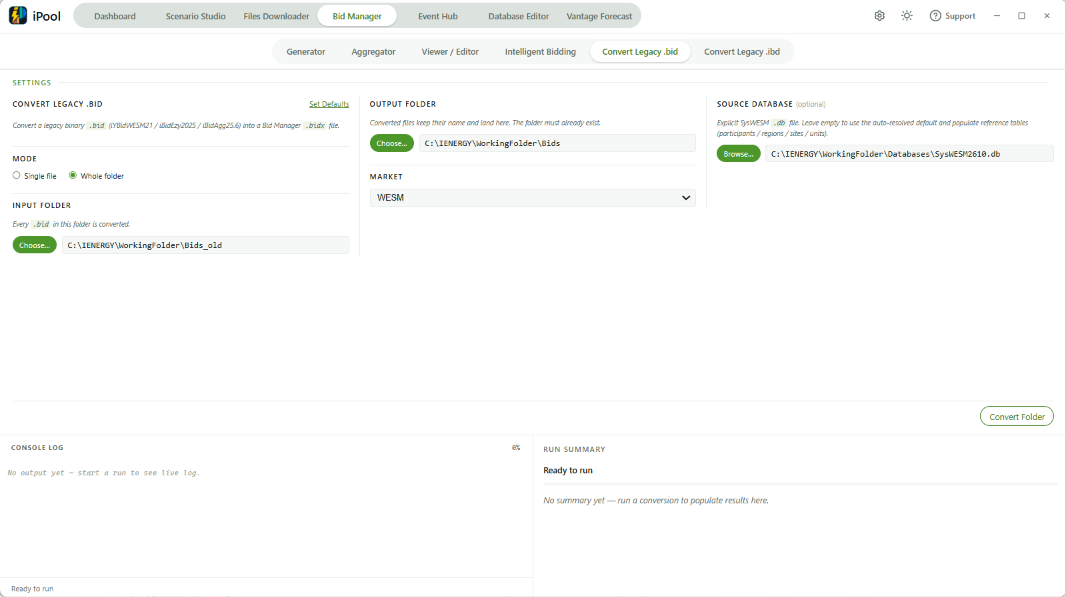
- Mode: Select Single file (blocking, not cancellable) or Whole folder (streaming, cancellable).
- Single file: pick a
.bidfile. - Whole folder: pick a folder.
- Optional Source Database: provides reference tables (participants / regions / sites / units).
- Output:
- Single-file mode → pick the output
.bidxfile path. - Folder mode → pick the output folder.
- Single-file mode → pick the output
- Market: WESM or AEMO.
- Optional: click Set Defaults to open the initialiser modal and configure default paths.
- Single file: click Convert.
- Whole folder: click Convert Folder.
- Output files are
.bidxby default.
Convert Legacy .ibd
- 1. Open the tab
- 2. Choose mode & input
- 3. Set market & output
- 4. Run & review results
Navigate to the Bid Manager tab, then click the Convert Legacy .ibd sub-tab.
This tab converts legacy dynamic bid .ibd files to .ibdx.
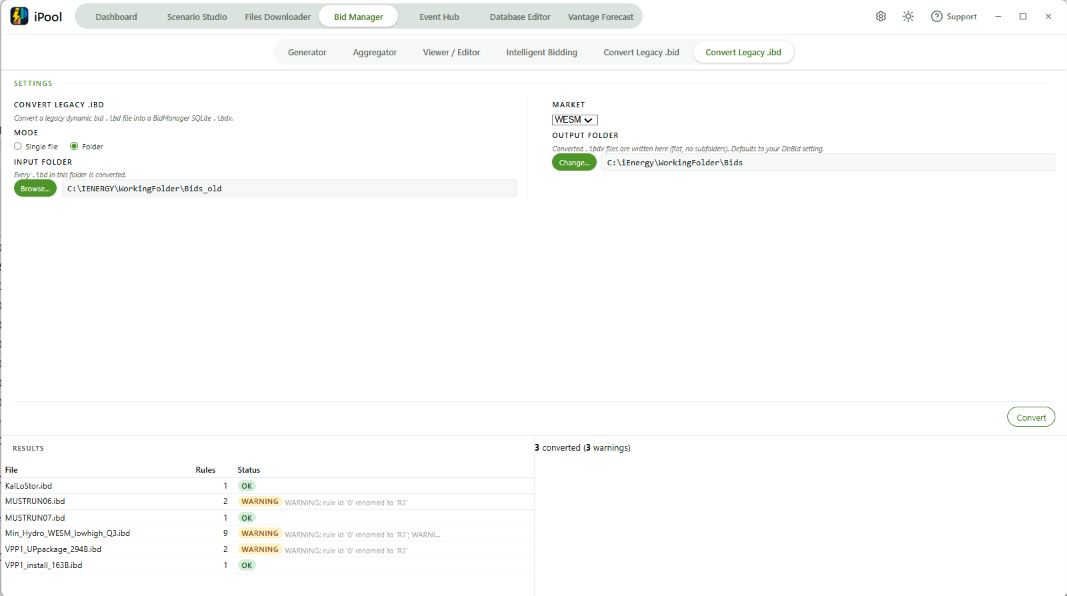
- Mode: Select Single file → pick a
.ibdfile; or Folder → pick a folder. - Folder mode: an Include Subfolders checkbox appears if the selected folder has subfolders.
- Market: WESM or AEMO.
- Output folder: defaults to the DirBid setting; click Change... to override.
- Click Convert (shows Converting... while running; cancel available mid-run).
- Results table shows: File, Rules, Status.
- Status badge values:
ok/warning/error/skipped/overwritten. - Summary line: N converted (N warnings), N errors, N skipped.
Command-line alternative: iPoolSuite.exe -ibd2ibdx -indir <dir> -outdir <dir> (-all | -file NAME ...) [-overwrite] [-market WESM|AEMO]